Dadafu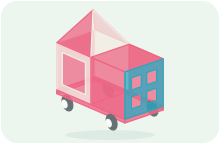
A family building guide
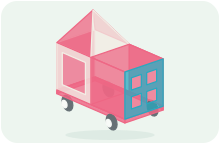
Two-Tone Ice Cream Truck
11 magnetic tiles + 1 car base · 5 steps
An open serving window and a strawberry-and-vanilla shop roof
What pieces do you need?
- ×1car bases
- ×5square tiles
- ×1four-pane window tiles
- ×1square frame tiles
- ×4equilateral triangle tiles
Compare with your tile set
Choose the exact set to compare quantities. For other brands or mixed boxes, use each plan’s piece list.
Five squares, four triangles, one open frame, one window and one car base: 12 pieces. Frames and windows need 1-by-1 outer edges and the deck must be 2-by-1. Check sizes and magnets. Physical assembly has not been tested.
Open a tiny ice cream shop on wheels together. The driver sits in front and the shopkeeper serves from the back. The pointed roof is a shop marker you can spot from afar. Swap roles and serve pretend ice cream to finger customers.
Before you build with real tiles
- Use squares, open frames and window tiles with the same unit edge, plus a 2-by-1 chassis with compatible deck magnets. Check sizes and magnet positions first. Any colors can be used.
- This is a digital design; physical assembly has not been tested. Matching quantities, digital connections and physics simulations do not replace a hands-on build.
- Build on a flat surface, with an adult steadying each stage. Push the chassis gently instead of lifting by the roof. Use pretend cargo and missions only.
- One complete open frame makes the serving window; no extra door or counter is required. Four triangles close the pointed roof. Assemble them beside the vehicle, then support the roof while placing it.
- The two roof colors identify your shop; choose any pretend flavors. No opening doors or moving mechanisms are modeled.
How to build it, step by step
1. Choose a parking spot
Add in this step: 1 car bases
Place the chassis flat, with its long direction running front to back. The blue front window will mark the nose.
Hands-on tip: Try one square against a deck edge, then remove it. Use a 2-by-1 magnetic deck; the wheels are not attachment points.
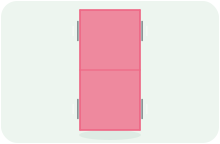
Step 1 / 5 2. Build the driver’s cab
Add in this step: 2 square tiles · 1 four-pane window tiles
Stand a square on each side of the front half and put a blue window across the nose, making a three-sided cab.
Hands-on tip: Join all three bottom edges to the chassis and close both front corners before releasing them. Do not add a duplicate center wall.
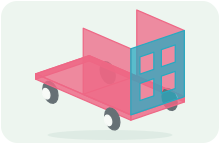
Step 2 / 5 3. Leave an open serving window
Add in this step: 2 square tiles · 1 square frame tiles
Add a square to the rear-left side and the back. Use an open frame on the right as the serving window.
Hands-on tip: The frame must match the square’s outer size. Attach all three pieces to the deck and join the side seams to the cab.
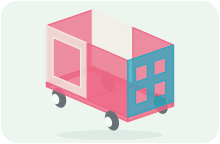
Step 3 / 5 4. Close the flat cab roof
Add in this step: 1 square tiles
Lay one square over the front half only, leaving the shop area for its pointed roof.
Hands-on tip: Align its three outside edges with the cab walls; its rear edge sits at the body’s center line. Do not press or lift by the roof.
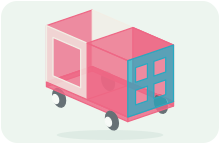
Step 4 / 5 5. Make the two-tone pointed roof
Add in this step: 4 equilateral triangle tiles
Join four triangles beside the truck, alternating two colors. Support the complete roof while placing it over the shop, joining the wall tops and the cab roof’s rear edge.
Hands-on tip: Close all four triangles together first; do not leave a lone triangle standing on the truck. Align every base edge before releasing it, and stop to check if real magnets do not hold.
Step 5 / 5
A little help for grown-ups
You do not need to plan a lesson. Use these prompts when you reach a tricky step, or when your child wants to try an idea of their own.
1. Choose a parking spot
Let your child choose the starting spot while you check the magnetic fit.
See this step2. Build the driver’s cab
One builder steadies a side while the other adds the front. Let your child choose a side, then swap jobs for the next stage.
See this step3. Leave an open serving window
Invite your child to be the shopkeeper and greet a finger customer through the window. Choose a shop name together.
See this step4. Close the flat cab roof
Let your child choose the roof color. Hold the body together and lower it slowly.
See this step5. Make the two-tone pointed roof
Your child chooses flavor colors while you support the roof. Once it is in place, announce that your shop is open.
See this stepKeep playing together
Put the 12 pieces within reach and leave a small flat area for a street corner. Use any colors. Fingers can be customers, so no extra props are needed.
Take a role, then swap
Shop designer
Your child chooses the shop name and two flavor colors, then starts with a favorite side.
Building partner and customer
Steady the corners and support the pointed roof, then be the first finger customer. Swap roles for the next order.
Start your story
Open for business
A finger visits the serving window and orders pretend ice cream. The shopkeeper introduces today’s new flavor.
Deliver something sweet
Choose another street corner on the table and gently push the chassis there. Park, swap driver and shopkeeper roles, and serve the next customer.
Try a variation
Use the same pieces with different roof colors, or turn the shop into a juice truck. Name it together and let your child decide how to welcome customers.
Celebrate your build
Park at your favorite corner and share the funniest order from your game. If you like, take a photo of the shop you made together.
Take this plan to the building table
Your subscription includes printing and saving PDF guides: materials, views, building steps and parent tips, ready for your family to use together. A parent manages sign-in and the subscription.
Print / Save as PDF